
Paragraphs – Line Spacing and Indentations
Dealing with line spacing and indentation can sometimes get quite tricky. Here are simple ways to deal with them.
Setting the line spacing of the text
- Select the relevant text.
- Click the Line spacing button
 located on the ribbon.
 - Choose a new line spacing from the appearing list:
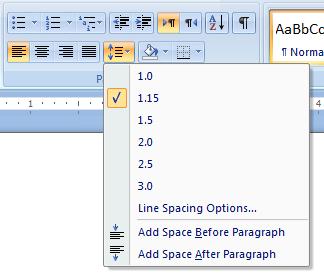
Note that changing the line spacing, will affect the line spacing within paragraphs, as well as between the paragraphs of the selected text area.
If you wish to apply more spacing between paragraphs only see the following section.
Setting the line spacing between paragraphs
- Select the relevant text.
- Open the "Paragraph" dialog box, by clicking the small arrow at the lower-right corner of the Paragraph group in the ribbon.
- Set the new spacing between paragraphs, by entering a new value in the “After:” text field.
Note that the “After:” field relates to the spacing after every paragraph, but it actually doesn’t make much difference if you set the value in the “After” or in the “Before”, the outcome will look very much alike. (that is because ones paragraph’s “after” space, is the next paragraph’s “before” space). The difference between the two will be more relevant when using advanced features such as applying different Word Styles.
Setting the paragraph indentation
You can set the left margin of a specific paragraph (its “indentation”) as follows:
- Select the relevant paragraph.
- Click the “Increase Indent” button in the mini toolbar
 (you can find this button on the ribbon too).
 - Repeatedly clicking this button will increase the indentation more.
- You can decrease the indentation by clicking the complementary “Decrease Indent” button
 next to it.
You can set the indentation to a specific value, by opening the Paragraph Dialog box, and setting a value inside the “Before text” field. (The Paragraph Dialog box can be opened by clicking the small arrow in the lower right corner of the “Paragraph” group in the ribbon, when the “Home” tab is selected).
Setting the indentation of the paragraph's first line
- Select the relevant text.
- Open the Paragraph dialog box (by clicking the small arrow at the lower-right corner of the “Paragraph” group on the ribbon).
- Change the “Special:” field from “(none)” to “First line”.
- Set the value of the first line indentation inside the “By:” field.
- Click the “OK” button.